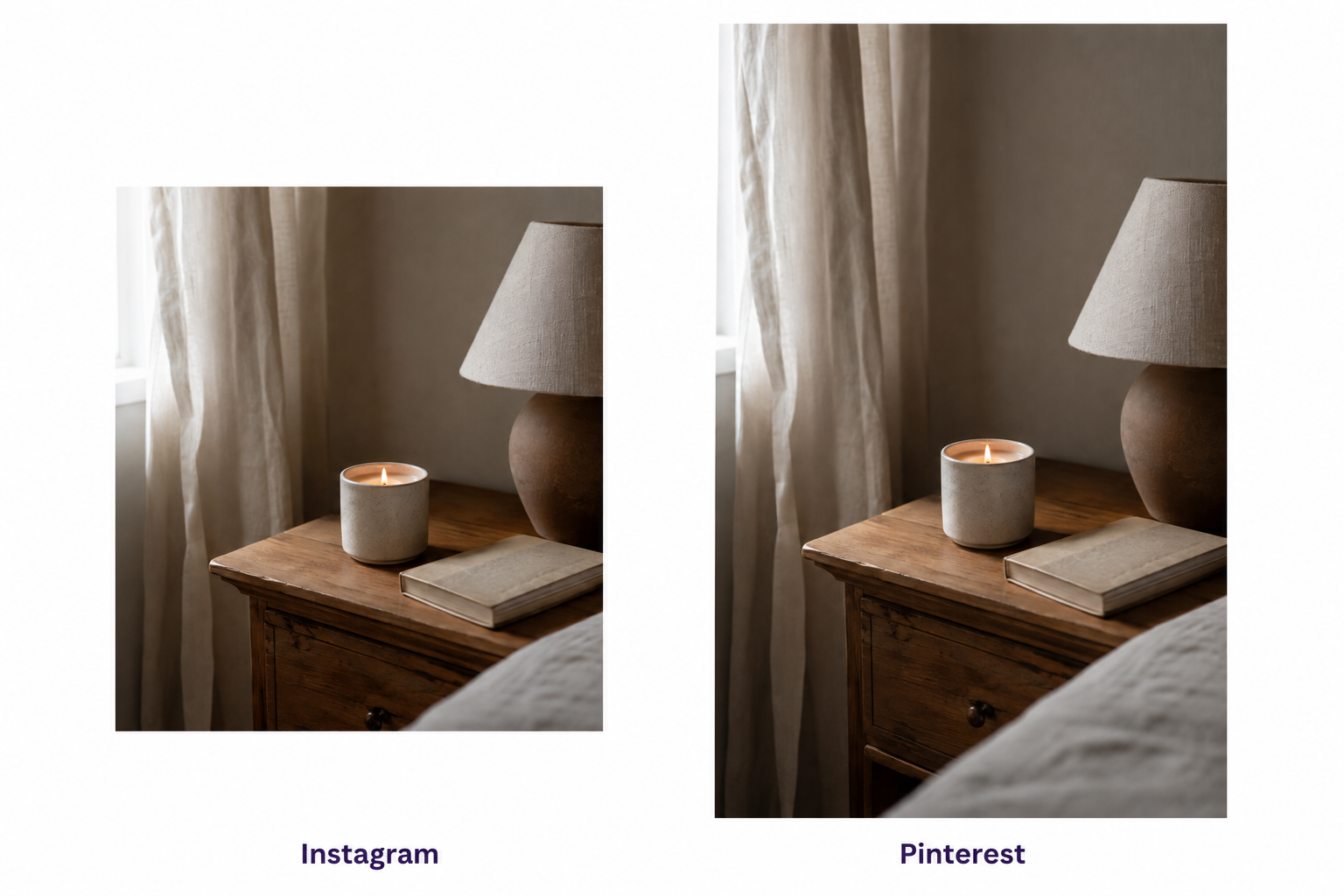
You’ve been posting consistently. Every new product shot, every lifestyle flat lay, every “new drop, link in bio” caption goes up on Instagram, and then, five minutes later, on Pinterest too. Same image, same caption, different platform.
And your Pinterest saves are… fine. Flat. Not embarrassing, not exciting. Just fine, month after month, while someone else’s boards in your niche seem to snowball.
Here’s the thing nobody told you: you’re not doing anything wrong on Instagram. You’re just running an Instagram playbook on a platform that doesn’t work like Instagram at all. Pinterest content formats aren’t a smaller version of your Instagram content; they’re a different sport wearing similar-looking gear.
Once you see the difference, it’s genuinely hard to unsee. And the fix is smaller than you’d think.
(If you haven’t got catalog sync and Performance+ running yet, that’s step one before any of this – we covered it in Pinterest for Shopify Stores in 2026. This post picks up where that one left off.)
Why Pinterest users behave nothing like Instagram users
Instagram users are scrolling to be entertained right now. Pinterest users are searching to plan something later, sometimes months later.
That single difference explains almost every format mistake founders make. A 2025 survey covered by Search Engine Land found that 36% of Pinterest users start their searches on the platform instead of Google, rising to 39% among Gen Z. They’re not there for a dopamine hit between subway stops. They’re there because they typed “small bathroom storage ideas” the way you’d type it into Google.
That intent gap shows up in how long content lives, too. Industry estimates suggest a Pinterest pin’s “half-life,” the point at which it’s earned half of its lifetime engagement, sits around 3.5 months, with a traffic tail that can stretch anywhere from four to eighteen months. An Instagram post, by the same kind of estimate, is largely done working for you within about 48 hours. That’s not a Pinterest-official number; it’s a well-corroborated agency estimate, but the order of magnitude is the point: your Pinterest content has to survive being found again, weeks or months from now, by someone who has no idea it exists yet.
But don’t over-round this into “Pinterest users plan for months, full stop.” It’s messier, and more useful, than that. Pinterest’s own data shows around 60% of purchase actions happen within 0-7 days of a save, so plenty of planning is short-fuse. At the same time, category research genuinely does run long: Pinterest reports that 56% of Pinners start holiday shopping research in September, an average of 10.4 weeks before they buy, which is earlier than TikTok or Instagram shoppers start. Planning happens on two speeds on this platform. Your content needs to work for both.
The mistake: what “repurposing” actually breaks.
Repurposing breaks two things at once – the shape of the image and the point of the caption – and either one alone is enough to tank your saves.
Start with shape. Instagram rewards square or portrait crops built for a feed you scroll through with your thumb. Pinterest’s native canvas is 2:3, taller and narrower, built to be scanned in a grid where six or eight pins sit side by side. Crop your square Instagram asset down to fit, or worse, leave white bars top and bottom, and you’re handing the algorithm (and the human eye) a smaller, weirder-looking version of something that wasn’t built for this space to begin with. A pin shot natively at 2:3 simply takes up more visual real estate in the grid. More real estate, more chance of a stop-scroll.
Then there’s the caption problem, and it’s the bigger one. “New drop, link in bio” is written for someone who already follows you and is glad to see you. It answers zero search queries. Pinterest is not a feed you check in on; it’s a search engine you type into, and Pinterest itself has been leaning hard into that framing lately – its Cannes Lions 2026 announcements (Business Assistant, an “Ask Pinterest” AI search feature) are explicitly about positioning the platform as an AI-native discovery engine, not a social app. A caption built for followers has nothing to say to a stranger who just searched “gifts for someone who has everything.”
The Pinterest content formats half the internet still recommends don’t exist anymore.
If a guide tells you to start making Idea Pins for Pinterest in 2026, it was written before 2024, and nobody’s gone back to fix it.
This part isn’t us being smug about other people’s outdated blog posts. It’s the opposite, actually – it’s the most useful thing we can tell you, because acting on bad format advice wastes real hours. Pinterest folded Idea Pins into a single “Create Pin” flow back in May 2023, and organic Idea Pin creation was switched off entirely sometime during 2024. They still exist, technically, but only as a paid ad format called Idea Ads. If you’re a Shopify store posting organically, that door is closed. Full stop, past tense.
Carousels are trickier, because they’re not dead, just narrower than most guides admit. Organic carousel creation is currently limited to Business accounts, in markets where Pinterest ads are available, and only from desktop. That’s three conditions stacked on top of each other. Plenty of accounts that fit two out of three still won’t see the carousel option in their creation tools. Don’t plan a whole content calendar around a feature you haven’t confirmed you actually have – open your account and check first.
These are the Pinterest content formats genuinely available to you right now, organically, on both web and mobile: the standard image pin (2:3), video pins, product pins pulled from your catalog feed, and collages. That last one is worth its own section.
What planner-mode Pinterest content formats actually look like
Swap single-shot product content for assembled, answer-shaped Pinterest content formats – they don’t need to be complicated; they just need to answer a question someone actually typed.
Here’s the practical swap table. Same source asset, different Pinterest-native shape:
| Your Instagram asset | Pinterest-native swap |
|---|---|
| Product flat lay + caption | Buying guide pin – standard image, 2:3, text overlay like “5 things to look for in a diffuser” |
| Outfit or room photo | Styling / how-to-use checklist pin – numbered tips over a standard image |
| Single product shot | Comparison pin – “this vs. that,” standard image |
| Launch announcement | Collage – genuinely organic, still underused |
| Behind-the-scenes clip | Video pin |
The buying-guide swap isn’t a hunch. Buying-guide-style content in food, DIY, and fashion niches tends to land 1-2% save rates, roughly double the platform average for standard product pins. A save rate that high, sustained over months rather than hours, compounds in a way an Instagram like never does.
The collage deserves a callout because it’s the most underused format available to you today. Pinterest built a dedicated organic collage tool, on both web and mobile, open to personal and business accounts alike, that lets you assemble multiple images (several products, a full outfit, a room’s worth of items) into one pin someone can tap through piece by piece. One important distinction: this is not the same thing as the AI “auto-collage from catalog” feature Pinterest has been testing with advertisers since 2025, which builds collages automatically from your product feed for paid campaigns. That’s a different tool, for different accounts. The organic collage builder is just sitting there in your app, free, and most stores never touch it.
One thing we’re deliberately not citing: the old “Idea Pins get 4x engagement” stat you’ll see in a lot of 2023-era guides. It’s true, was true, described a format you can no longer make. Leave it out of your planning entirely.
A worked example: one Instagram post, three Pinterest pins
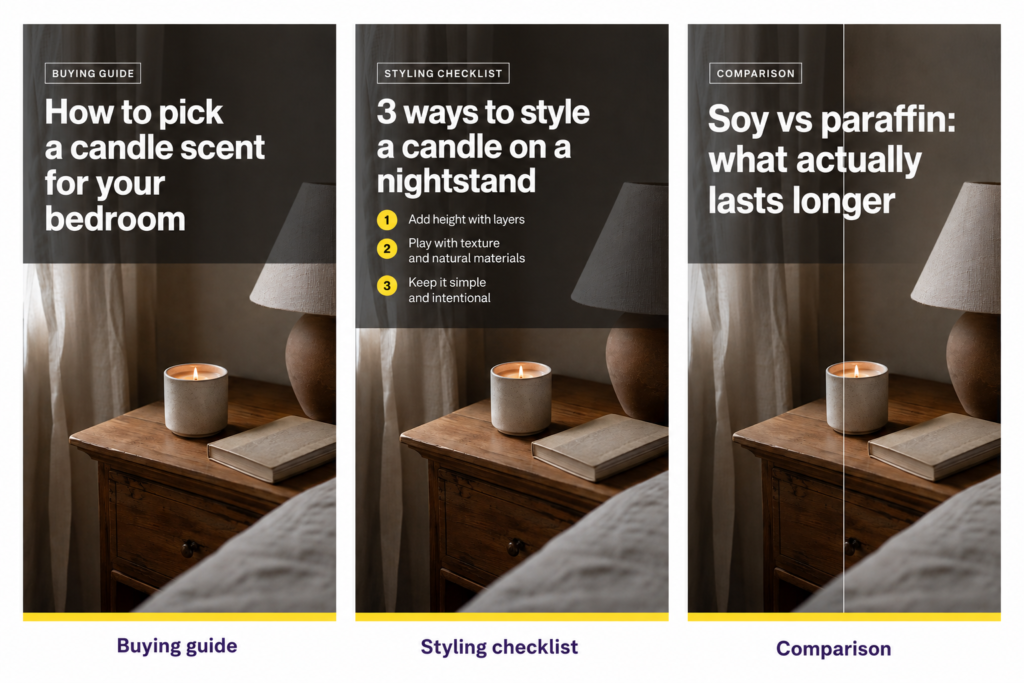
Say you sell candles, and you just shot a lifestyle photo of your new “Afterglow” candle on a nightstand for Instagram. Here’s how that one asset becomes three different Pinterest content formats instead of one flat repost.
Pin one, buying guide: crop the candle shot to 2:3, overlay “How to pick a candle scent for your bedroom (without the headache).” Search-shaped, answers a real question, works even for someone who’s never heard of your brand.
Pin two, styling checklist: same nightstand scene, numbered overlay – “3 ways to style a candle on a nightstand.” Speaks to the room-planning searches Pinterest users run constantly.
Pin three, comparison: your candle next to a competitor-style unscented option, “soy vs. paraffin: what actually lasts longer.” Comparison content performs because it resolves a decision, not just shows a product.
If you sell into homdécoror specifically, this is a good moment to think seasonally too. Pinterest’s Predicts 2026 report flags “afrobohemian homdécoror” as up roughly 220% year over year – the kind of trend worth building a buying-guide series around 8 to 12 weeks before the season actually peaks, not the week of.
How to know it’s working
Watch your save rate relative to impressions, not just outbound clicks, because saves are the signal planner-content is designed to earn.
An outbound click means someone acted today. A save means someone filed you away for later, which, on a platform where searches lead purchases by weeks or months, is often the more honest early signal that your content is doing its job. If your save rate creeps up while clicks stay roughly flat, that’s not a failure; that’s the format working the way it’s supposed to.
Be honest with yourself about timing, too. Given the pin lifespan numbers above, this genuinely takes weeks, sometimes a couple of months, to show a clear trend, not days. If you swap five pins to planner-format on Monday and check Friday, you’ll learn nothing. Give it real time before you judge it.
Where to start if you’re short on time
You don’t need to rebuild your whole Pinterest board this week. Pick three assets you’ve already shot for Instagram, sitting in your camera roll right now, and turn each one into exactly one planner-format pin: one buying guide, one comparison, one collage. That’s it for week one.
You already have the photos. You’re just going to ask each one a different question this time.
One thing formats alone won’t solve: timing. Planner-format pins need weeks to get found, which matters enormously heading into the holiday season. If that’s where you are right now, my month-by-month Pinterest Q4 calendar shows exactly when each piece of this needs to be live.
FAQ
What’s the difference between Pinterest content and Instagram content?
Instagram content is built for followers scrolling a feed in real time; Pinterest content is built for strangers searching for an answer, sometimes months later. That means Pinterest pins need search-shaped text overlays and captions, a taller 2:3 image format, and content that still makes sense to someone finding it long after you posted it. For more on the platform basics, see our Pinterest marketing posts.
Do I need to stop posting product photos on Pinterest entirely?
No. Product and rich pins pulled from your Shopify catalog still belong on Pinterest and remain the backbone of most stores’ pin libraries. The point isn’t to abandon product shots; it’s to add buying-guide, comparison, and collage pins alongside them so you’re answering searches, not just showing items.
How long does it take for Pinterest content to start working?
Longer than social media trains you to expect. Industry estimates put a pin’s engagement half-life around 3.5 months, with traffic sometimes continuing well beyond that. Give new planner-format content at least four to eight weeks before judging save rates or traffic, rather than checking daily like you would on Instagram.
What’s a buying guide pin and how is it different from a product pin?
A product pin shows one item pulled from your catalog. A buying guide pin answers a decision question – “5 things to look for in a diffuser,” “soy vs. paraffin candles” – using a standard 2:3 image with a text overlay. Among Pinterest content formats, buying-guide-style pins in categories like food, fashion, and DIY tend to land 1-2% save rates, roughly double the average for standard product pins.
Can I still make Idea Pins on Pinterest?
No, not organically. Pinterest merged Idea Pins into its single “Create Pin” flow in May 2023, and organic Idea Pin creation was fully switched off during 2024. The format survives only as a paid ad unit called Idea Ads. Any current guide recommending organic Idea Pins is out of date.
Should I use Pinterest’s collage format for my Shopify store?
Yes, if it’s available on your account – it’s genuinely organic, free, and underused by most stores. Open your Pinterest app and check for the collage tool under pin creation. Just don’t confuse it with Pinterest’s separate AI “auto-collage from catalog” feature, which is a paid advertiser tool built from your product feed, not something you build by hand.
How many pins per week should a Shopify store post?
There’s no single magic number, and chasing volume over format quality is exactly the trap this post is about. A better starting rule: three to five well-made planner-format pins a week, drawn from assets you’re already shooting for Instagram, will do more than fifteen rushed reposts. Consistency over months matters more than any weekly count.